● Available now · Apple Watch-first

Track
the jump.
Log the
story.

Arm BreakOff before boarding. Don't touch it again until you're back on the ground. It follows the whole jump — climb, freefall, canopy, landing — and turns it into a clean, permanent logbook. Leave your phone behind. No end-of-day reconstruction.

1-week free trial on every plan · your first tracked jump is saved free

BreakOff freefall screen on an Apple Watch Ultra showing live altitude
What it is not
A backup altimeter, audible altimeter, or emergency device

Important: BreakOff is a jump tracker and logbook companion only. It is not a backup altimeter, audible altimeter, emergency device, or life-saving system. Always use your certified altimeter and audible as your primary altitude reference on every jump. Your AON2, Viso or Quattro stays on as your primary instrument — exactly as it should.

How it works · one arm-tap per jump

Start it once.
Then go skydive.

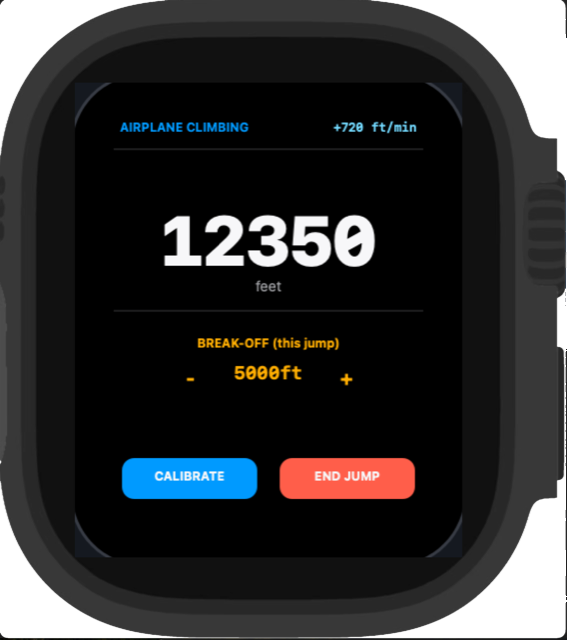
BreakOff follows the same rhythm as a real load: climb, exit, freefall, canopy, landed. Keep scrolling and the side dial follows that journey instead of jumping around.

Climb
0 → 13,500 ft · armed before boarding

Start the session from Apple Watch before you board. The phone stays behind, the Watch stays ready, and the climb becomes the first part of the record.

  • Climb detection from barometric altitude — no buttons on the ride up
  • Wind brief with ground and altitude layers before the door opens
  • Clear status while you wait for exit
BreakOff climb screen on Apple Watch during the ride to exit
At altitude · what jumpers actually wanted

Less admin.
More jumping.

The pain points were simple: people did not want to carry their phone, tap through screens in the air, or rebuild the jump from memory at the end of the day.

Phone stays behind

BreakOff is Apple Watch-first, so you do not need an iPhone on the skydive to track the jump.

Touch-free in the air

Phase changes are automatic. You fly the skydive; BreakOff handles the logbook data.

Not a safety device

It is deliberately a tracker and logbook companion. Your certified altimeter and audible remain primary.

No reconstruction

Exit, deployment, freefall time, GPS, wind, heart rate, gear and notes all land in one place.

Freefall
13,500 → 3,500 ft · hands stay where they belong

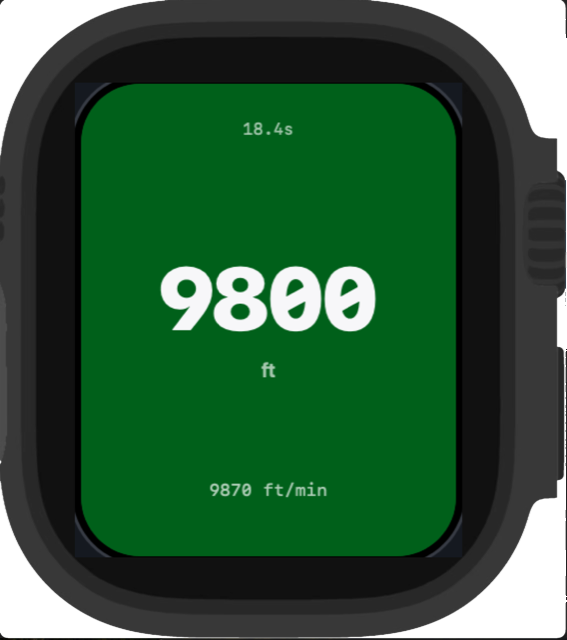
Sustained descent flips BreakOff into freefall automatically. It times the skydive while you fly, then records the key moments for your debrief.

  • Freefall clock and altitude tracked from exit
  • Break-off and deployment settings captured as logbook context
  • Zero interaction — the Watch works, you skydive

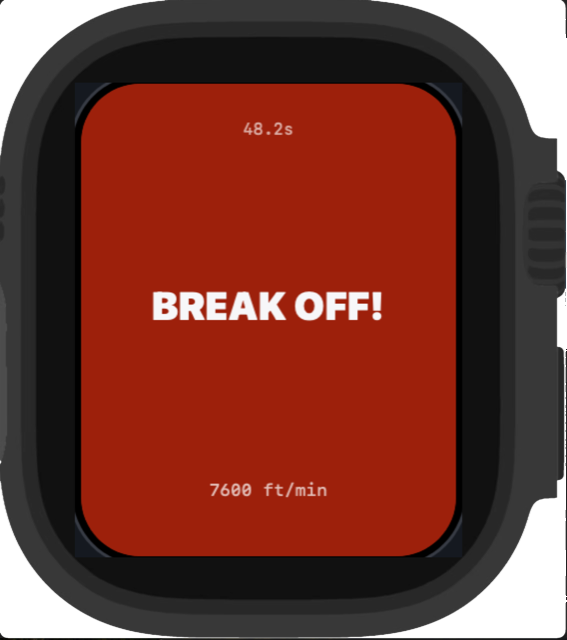
Reminders are logging cues — never a substitute for your altimeter or audible.

BreakOff freefall screen with live altitude BreakOff break-off reminder screen
Field proof · real jumps, real screens

Replay a
real jump.

Two field demos: the Apple Watch moving through the phases during an actual jump, and the iPhone GPS debrief afterwards. Real footage, real app screens.

Watch · jump mode in the air

iPhone · GPS track debrief

Canopy
3,500 → 0 ft · opening detected

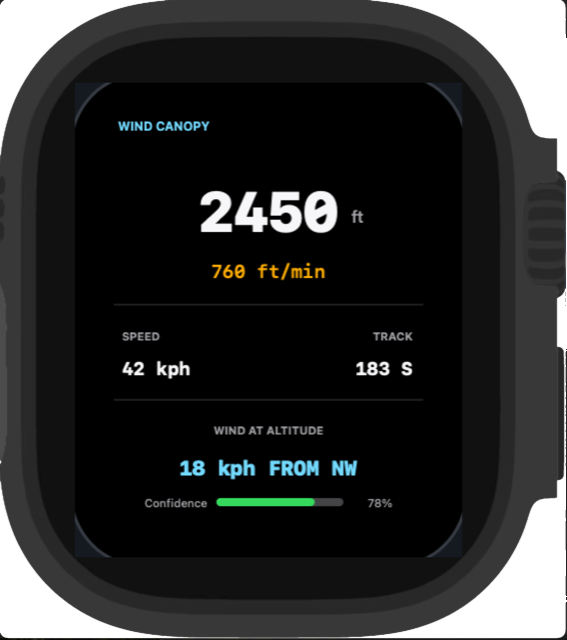
The opening is detected from the change in descent rate. Under canopy, the screen becomes a cleaner ride-home readout while the data keeps recording.

  • Canopy phase data captured for review after landing
  • Wind context and canopy movement available in the debrief
  • Landing detected when you're down and stopped
BreakOff canopy screen with altitude and wind readout
Landed
0 ft · saved before you've packed

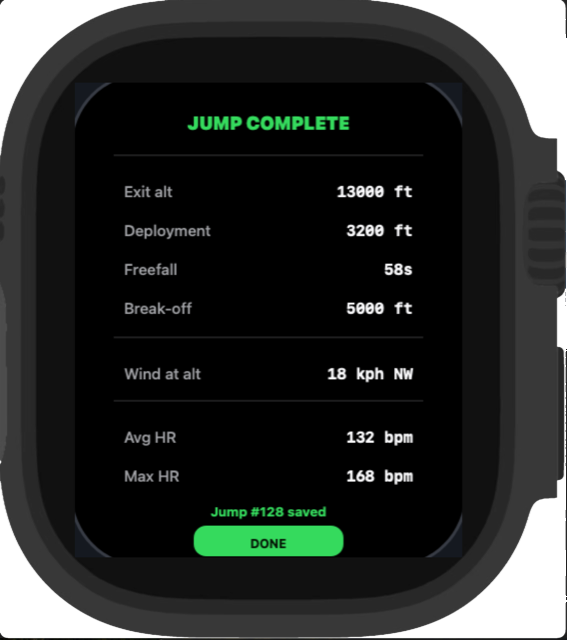
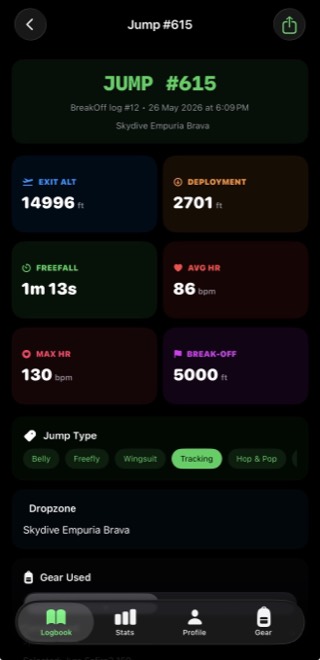
Exit altitude, deployment altitude, freefall time, GPS track, heart rate, wind — captured into a jump record and synced to your iPhone logbook.

  • Jump summary on your wrist the moment you land
  • Syncs to the iPhone logbook automatically
  • Gear and lineset jump counts update themselves
BreakOff post-jump summary screen
After the jump · iPhone

Less homework.
Better records.

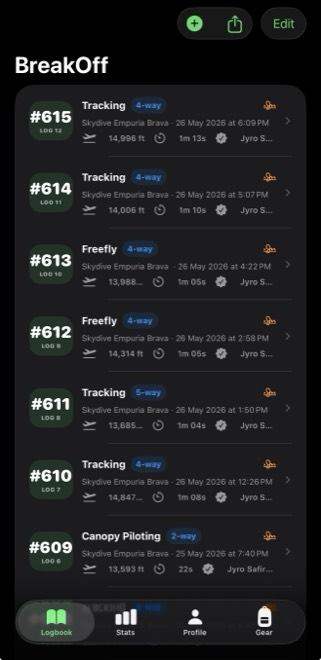
Every tracked jump becomes a complete logbook entry on its own. Tap the views below and explore what is waiting once you are back on the ground.

BreakOff iPhone logbook list
BreakOff jump detail with GPS track and altitude profile
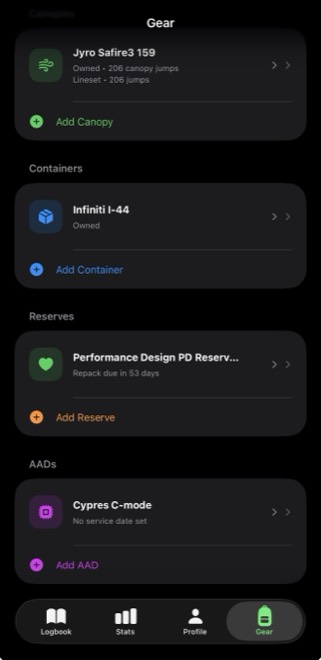
BreakOff gear tracking screens

LogbookAutomatic entries with jump number, DZ, altitudes, freefall time, aircraft, jump type, notes, signing fields and export-ready records.

The logbook

  • Automatic entries — number, date, DZ, altitudes, freefall time
  • GPS track on a map with altitude-coloured path and profile graph
  • Jump types, formations, aircraft, notes and linked video
  • In-person sign-off fields inspired by familiar logbook workflows
  • PDF and CSV export — your record stays portable

The gear

  • Canopy and lineset jump counts that update per jump
  • Reserve repack and AAD service reminders
  • Rental days kept separate from your own rig
  • Lineset replacement history per canopy
  • Local + iCloud backup with restore after reinstall
Quick answers

What jumpers ask
before downloading.

The short version: BreakOff is a Watch-first tracker and logbook. It is built to reduce admin, not replace your instruments.

Do I need my iPhone on the jump?

No. Start the jump from Apple Watch and leave your iPhone behind. The tracked jump syncs back to the iPhone app after landing.

Is BreakOff an altimeter?

No. BreakOff is not a certified altimeter, audible altimeter or emergency device. Use certified skydiving instruments and your normal procedures on every jump.

What does the free trial include?

Eligible monthly and yearly subscriptions include a 1-week free trial through Apple. Apple shows price, eligibility and renewal details before confirmation.

Can I keep my records?

Yes. BreakOff supports structured logbook records, iCloud/CloudKit backup where enabled, and export options so your jump history stays portable.

Proof · real dropzone feedback

Built with
skydivers.

BreakOff is being shaped by people who understand the rhythm of a jump day: the climb, the dirt dive, the pack job, the missing signature, the gear admin, and the “I'll log it later” problem.

Carla Taboada, BreakOff brand ambassador
Brand ambassador
Carla Taboada
7,000+ skydivesAFF instructorTandem instructorCoach

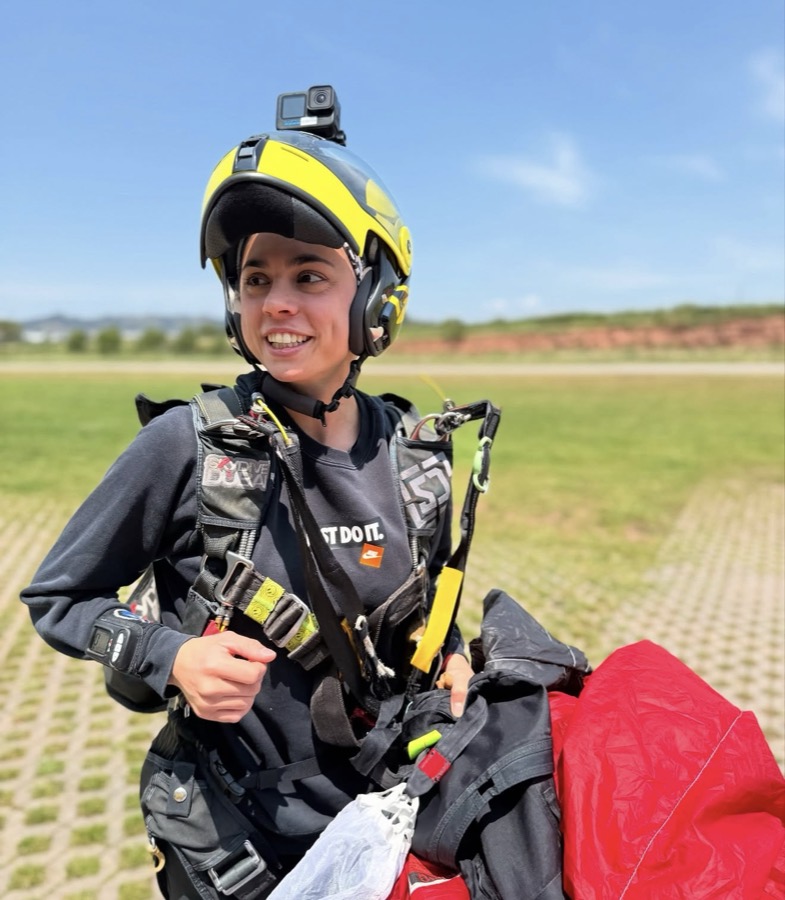
Carla is part of the BreakOff team — a highly experienced skydiver, AFF instructor, tandem instructor and coach. Currently at Skydive Empuriabrava after many years at Skydive Dubai, where she coached and trained a large number of AFF students.

Her feedback keeps BreakOff grounded in real dropzone use, not app-store theory.

“BreakOff feels like it has been built by someone who actually understands jump days. The pre-jump flow, the Apple Watch tracking and the logbook all solve real problems skydivers care about.”
Carla on Instagram →

Only BreakOff lives on the jump.

Runs on your wrist during the skydive — not on a phone in the packing areaBreakOff ✓Others ✗
Detects climb, freefall, canopy and landing automaticallyBreakOff ✓GPS-only / manual
Pre-jump wind brief with altitude layersBreakOff ✓Others ✗
Gear, canopy and lineset counts connected to every jumpBreakOff ✓Separate apps
Full logbook with GPS, signing fields and PDF/CSV exportBreakOff ✓Partial

Every other skydiving app is used before or after the jump. BreakOff is designed to live on your wrist during it.
BreakOff founder under canopy
Built at the DZ, not in a boardroom

Built by a skydiver,
for skydivers.

BreakOff exists because logging jumps felt like homework after every jump day. It's built by one skydiver and tested jump by jump — the phase detection was tuned on real skydives, not in a simulator, and every release is field-tested before it ships.

The story so far →

v1.1.2 · July 2026

Built in public.
Improved by jumpers.

The latest release hardened Watch↔iPhone sync, backups and trial clarity. Every release note is public — see exactly what changed and why.

Read the changelog →
Feature requests open

Help shape what
BreakOff does next.

Canopy tools, coaching workflows, integrations — the roadmap is driven by real jumpers. Tell us what your logbook is missing.

Send feedback →
0 ft · landed

Landed. Now
log everything.

BreakOff Pro trial
1 week
free.

Start on the yearly or monthly plan and explore the full Pro flow — unlimited jump saves, gear tracking, stats, sync and backup. Cancel anytime before the trial ends.

And your first tracked jump is saved free — no subscription needed to see it work.

Eligibility, price and renewal terms are shown by Apple before purchase.
BreakOff app icon
BreakOff — Skydiving CompanionVersion 1.1.2 · Free download
Yearly plan: 1 week free
Monthly plan: 1 week free
Download on theApp Store

Requires a compatible iPhone and Apple Watch for watch-based jump tracking. Trial availability and renewal details are shown by Apple before confirmation.